
JPG to PDF Converter
আপনার ছবিগুলো একটাই PDF-এ জোড়া দিন — প্রতি পাতায় একটি ছবি — চাকরির আবেদন, ভর্তির ফরম ও স্ক্যান করা ডকুমেন্টের জন্য। PDF-টি আপনার ব্রাউজারেই তৈরি হয়; আপনার ছবি কখনো আপলোড হয় না।
আপনার ছবিগুলো এখানে ছাড়ুন অথবা ব্রাউজ করতে ক্লিক করুন
JPG, PNG, WebP · প্রতিটি 20 MB পর্যন্ত · আপনার ব্রাউজারেই প্রক্রিয়াকরণ হয়
আপনার PDF-এর ছবি (0)
তীর চিহ্ন দিয়ে ক্রম বদলান — প্রথম ছবিটিই প্রথম পাতা হবে।
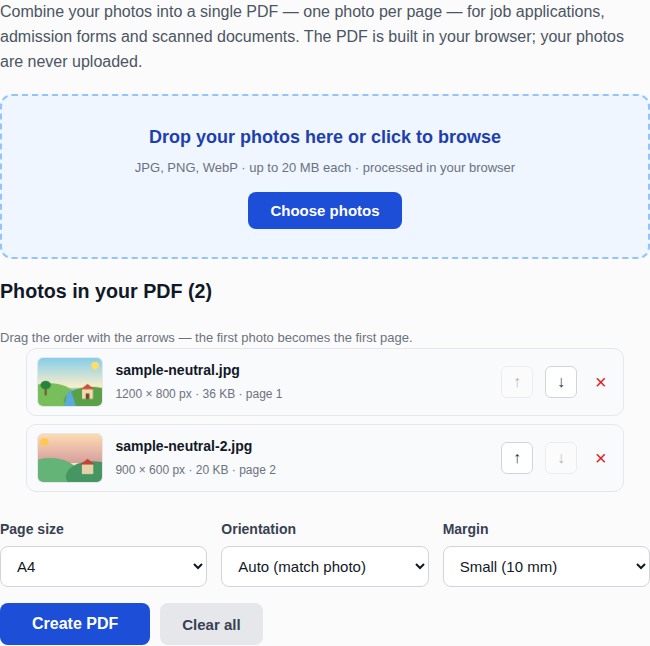
JPG to PDF কনভার্টারে ছবি থেকে PDF বানানোর উদাহরণ
How to convert JPG to PDF
Add your photos by dragging them onto the tool, clicking to browse, or pasting them from your clipboard. Use the arrows to set the page order — the first photo becomes the first page — then pick the page size, orientation and margin, and click Create PDF. The file downloads with one photo per page.
Why one PDF instead of many photos?
Job applications and admission forms usually ask for a single PDF file, not a folder of loose photos. A single PDF keeps your documents in order, opens the same way on every device, and is much harder to lose track of than ten separate attachments. Scanned certificates, mark sheets and ID cards all travel better as one PDF than as a zip of images.
Page size, orientation and margins
A4 is the standard page size in most of the world; Letter is the standard in the United States and Canada. “Fit to photo” makes each page exactly the size of its photo, with no white borders — good for portfolios. Auto orientation turns each page to match its photo, so a landscape photo gets a landscape page and a portrait photo gets a portrait page. The small margin keeps photos from touching the page edge when printed; choose “None” only when you want the photo edge to edge.
Frequently asked questions
Does converting reduce the photo quality?
JPG and PNG photos are embedded in the PDF as they are, so there is no quality loss. WebP and GIF photos are converted to JPG at high quality (92%) because the PDF format handles them that way.
How many photos can I add?
There is no fixed limit, but very large sets use a lot of browser memory. Up to about 20 photos works smoothly on most devices; for more than that, split them into two PDFs.
Are my photos uploaded anywhere?
No. The PDF is built entirely in your browser using a bundled library. Your photos are never sent to a server, stored or seen by anyone.
Can I change the page order after adding photos?
Yes. The up and down arrows on each photo move it one place, and the × button removes it. The page numbers update as you rearrange.